CloudBridal v26.7.1: Smarter Appointment Booking, Card-Reader E-Signing, and Showcase Collections
We're excited to announce CloudBridal v26.7.1. The appointment engine is more flexible with new scheduling modes and a beautifully redesigned booking page, customers can now sign agreements right on your card reader, texting compliance is handled for you automatically, your inventory showcase gains curated collections — and CloudBridal can now be installed as an app on your iPad or computer, complete with device notifications. Here's what's new:
View complete 2026 release notes →
📅 A More Flexible Appointment Engine
The engine behind appointment availability has been rebuilt to support new scheduling modes — while your existing schedules and slot availability keep working exactly as they do today. If you use fixed schedules, nothing changes; if you want more, it's there.
What's New:
- New scheduling modes: Alongside classic fixed-hours schedules, a schedule can now follow staff working hours — a chosen group of staff members, or anyone qualified for the appointment type — with one available staff member assigned to each booking automatically.
- Fine-tune staff-based scheduling: Choose who gets booked first (in your listed order, or balancing the daily load), limit staff members to the appointment types they handle, and set an optional maximum number of appointments per day.
- Let customers choose their consultant or room: Each appointment type can keep staff and rooms hidden (the default), reveal them after booking, or let the customer pick during online booking — complete with photos, titles, and room descriptions.
- Exclusive appointment types: Mark an appointment type as exclusive to reserve the whole store — nothing else can be booked at the same time. Perfect for private shopping experiences.
- Preview your availability: A new preview tool in appointment settings shows exactly which times customers can book on any date — and why other times are unavailable.
- A cleaner settings page: Appointment settings are reorganized into clear tabs with a step-by-step setup checklist.
- A week-at-a-glance schedule editor: Schedules are managed in a rooms-by-weekday grid — every cell shows how that room is bookable that day, with warnings when something needs attention and one-click shortcuts to add hours or preview a day. Rooms themselves are created and edited right from the grid.
- Fine-grained day control: Managing a specific date groups rooms by how they're staffed, lets you set a per-date booking window on staff-scheduled rooms, and can even allow bookings with no staff scheduled — perfect for trunk shows.
- Smarter in-app booking: When your staff books an appointment, the staff field pre-fills with who would be auto-assigned, the dropdown flags who's booked, off, or at their daily limit, and saving re-checks for conflicts — double-booking now takes an explicit confirmation, never an accident.
Key Benefits:
- More scheduling flexibility with zero disruption — existing setups behave exactly as before
- Optionally offer a boutique, personal touch by letting brides choose their consultant
- Protect high-value appointments with store-exclusive booking
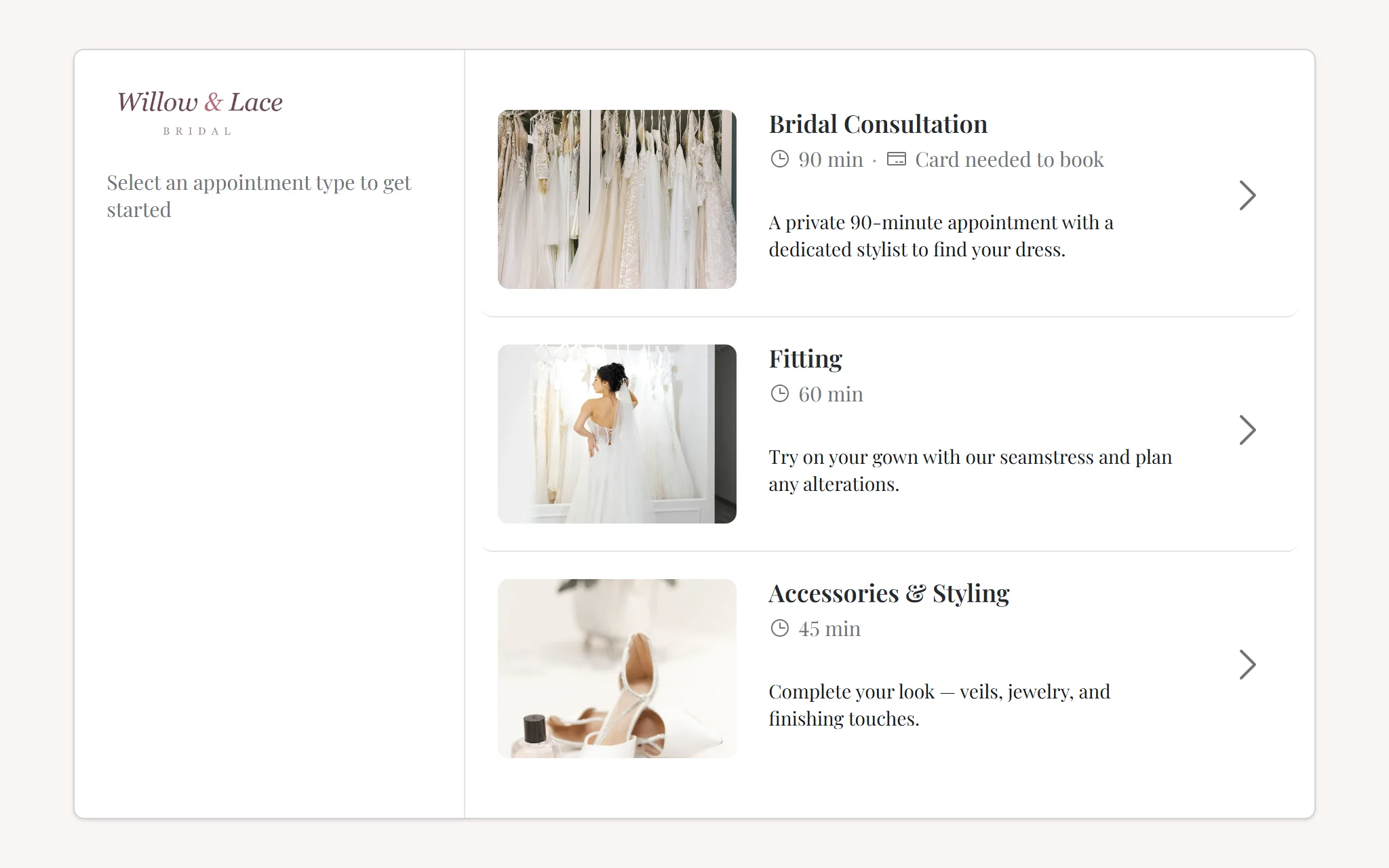
🖥️ A Redesigned Online Booking Page
The customer-facing booking page has been completely redesigned with a modern, boutique-worthy look.
What's New:
- A modern two-column layout: Booking now happens in a single elegant card — a live summary panel on the left, the booking steps on the right (stacking neatly on mobile). As the customer picks their appointment type, date, and time, the summary builds up beside them: duration, price, date and time, and staff or room when shown.
- Refreshed every step of the way: A cleaner appointment-type list, expandable descriptions for longer appointment details, and a new time picker that reveals available times beside the calendar — with waitlist-only times clearly distinguished from open slots.
- A polished finish: The confirmation screen leads with a clear booking status and shows your boutique's contact details, plus the assigned staff member or room when you've chosen to display them.
- Always on brand: The page uses your brand color with automatic readability adjustments, and boutiques without a custom color get a clean, neutral look — CloudBridal's own branding never appears on your customers' page.
Key Benefits:
- A booking experience that finally matches the caliber of your boutique
- Customers always see what they're booking — fewer mistakes and drop-offs
✍️ E-Signatures on Your Card Reader
Collecting a signature in store is now as natural as taking a payment.
What's New:
- Sign on the card reader: Customers can sign agreements directly on your Stripe smart reader (BBPOS WisePOS E and Stripe Reader S700/S710). Staff simply choose "Sign on Card Reader" and hand the customer the device.
- A dedicated in-store signing flow: "Sign In Store" opens the full document for the customer to review, then offers signing on the screen or on the reader from one persistent bar. Remote options (email a signing link) are grouped separately.
- Signature acknowledgments: Add up to three "I agree" prompts to a receipt template — like "All sales are final" — that customers must individually accept before they can sign. They're enforced on every signing channel (in store, by link, in the portal, and on the reader) and print alongside the signature on the executed document.
- Flexible document headers and live preview: Give each receipt template a printed headline like "Sales Receipt" or "Rental Agreement," then independently position the logo, business information, and document/customer information on the left, center, or right. Add tax registration numbers or other short legal details with the new Additional Business Details field, and use the live Preview tab to see unsaved changes immediately. The refreshed layout also adapts more cleanly to wide logos, long addresses, and elements placed in the same position.
- A clearer document viewer: Documents now show their status at a glance with a dedicated Audit Trail tab recording exactly how and when each signature was captured — including card-reader signings.
Key Benefits:
- Capture legally meaningful agreement right at the moment of sale
- Make key terms impossible to miss with per-clause acknowledgments
- Signed documents are preserved exactly as executed
E-signing is an Ultimate plan feature; card-reader signing requires the Stripe integration with a supported smart reader.
💬 Texting Compliance and Message Control, Handled for You
Text messaging rules (A2P/10DLC) keep getting stricter. This release makes CloudBridal handle the compliance mechanics so you don't have to think about them.
What's New:
- STOP and START just work: When a customer texts STOP, all texting to them stops immediately and their profile shows why. If they text START, messaging resumes. This is carrier-grade behavior — staff can't accidentally override it.
- Every message respects consent: Automated and manually sent messages alike pass a consent check before sending. If a message can't go out, staff see the specific reason instead of a silent failure.
- See what each customer can receive: Customer profiles now show a clear per-channel breakdown — texts and emails, updates and marketing — with the reason anything is blocked.
- Marketing consent you can manage: Record a customer's marketing-texts and marketing-emails preference right on their profile, with every change audited.
- Transactional vs. marketing templates: Each email and SMS template now has a purpose. Marketing templates only ever send to customers who opted in — and CloudBridal flags templates that look like marketing for your quick review.
- Skip or send any automated message: From the customer's message timeline, skip an upcoming automated email or text (and restore it later), or send it early — the schedule stays clean either way, with no duplicate sends.
- A compliant booking form: The online booking form no longer requires consent checkboxes to book (a common reason carriers reject business texting registrations). Customers see a clear text-message disclosure, plus an optional marketing opt-in.
Key Benefits:
- Stay compliant with carrier texting rules without policing them yourself
- Know at a glance exactly what each customer will and won't receive
- Full control over the automated messages going to any customer
🛍️ Showcase Collections and Search
Your inventory showcase can now open with a curated, boutique-style landing page.
What's New:
- Curated collections: Build collections like "New Arrivals," "Sample Sale," or a designer spotlight — each defined by the filters you choose (customer category, item types, tags, vendors, silhouettes) with its own title, description, and tile image. Items match automatically, so collections stay current as your inventory changes.
- A collection landing page: With at least one collection configured, your showcase opens as a gallery of collection tiles — each showing a representative image and live item count — plus an automatic "All Items" tile.
- Feature your favorites: Pin items to the front of any collection to control exactly what customers see first.
- Reveal pricing per collection: A collection can show prices even when your showcase hides them globally — ideal for a sample-sale collection with visible markdowns.
- Optional search: Turn on Enable Search by Item Name in your showcase settings to add a search box, so customers who know what they want can find it by item or designer name.
Key Benefits:
- Merchandise your showcase like a storefront window, not a spreadsheet
- Spotlight sales and new arrivals without touching individual items
📲 Install CloudBridal as an App
CloudBridal can now live on your home screen like any other app — ideal for the front-desk iPad and the register computer.
What's New:
- A real installed app: Add CloudBridal to your iPad's home screen (Share → Add to Home Screen) or install it on your computer (the Install icon in Chrome or Edge). It opens full-screen with its own icon — no browser tabs, no address bar — and stays signed in.
- Device notifications, even when the app is closed: The installed app can alert you to new and updated appointments, payments received, signed documents, task activity, auto-charge results, and accepted quotes. Tap a notification and CloudBridal opens straight to the right customer, appointment, or task.
- You stay in control: Notifications follow each staff member's existing notification preferences, are enabled per device (a quick prompt in the installed app, the notification bell, or Profile → Device Notifications), and shared devices are handled safely — a device only alerts the person signed into it.
- A more polished sidebar: Pin the navigation rail collapsed or expanded per device, with smoother animations throughout.
Key Benefits:
- Hear about bookings, payments, and signed documents the moment they happen — without keeping a tab open
- One tap from notification to the exact record
🗓️ Additional Improvements
- Preview order documents before saving: When creating a new order or quote, a Preview Document button shows the customer-facing document — terms, totals, and details filled in, watermarked as a preview — so you can review it with the customer before committing.
- Find items by variety, size, or color: Inventory search (and the order form's item picker) now matches option/variety names and variant sizes and colors — type "ivory" or a size and see every item that offers it.
- Stock purchase orders, reorganized: The Stock PO editor now groups lines by item type, adds a dedicated Variety column, and — when a variety carries a wholesale price — fills the unit cost with one click. Order lines stay linked to the right inventory item even if it's renamed before receiving.
- Click-to-fill sizes: When editing an order item, click any size in the vendor's size chart or size guide to fill it into the order directly.