Prom registry
Keep two students from wearing the same dress to prom.
Register each prom dress to a school or venue and a season when you sell it. If another student from that school wants the same style that season, CloudBridal tells you before the sale goes through. Included on the Ultimate plan.
30-day free trial · No credit card required · Compare plans
At the sale
Register the dress as part of the sale
When a student buys her prom dress, it’s registered to her school or venue and the prom season right on her order. There’s no separate list to keep up and no binder at the register.
Dresses sold before you started using the registry can be added too, so you can start mid-season.
- Registered on the order, at the moment of sale
- Every registration tied to a school or venue and a season
- Optionally prompt your team to register every prom sale
- Add dresses you sold earlier in the season
Duplicates
The same dress can’t be sold twice for one prom
If another student from the same school has already registered that dress for this season, CloudBridal stops the sale and tells you who has it. You find out while she’s still in the shop, and can help her choose another color or style, rather than hearing about it after prom.
- Checked against the dress, the school or venue, and the season
- Tells your team who already has the dress
- Works for dresses registered at the sale or added later
The check covers dresses that are registered, so we recommend registering every prom sale.
Color only
Allow the same style in a different color
Sometimes the same style in a different color is fine. You decide: register just the color she chose, and another student can still buy that style in a different color. Or register the style in every color.
Set the way you usually work as your default, and change it for any single sale.
- Register one color, or the style in every color
- Your shop’s default, with exceptions when you need them
The registry
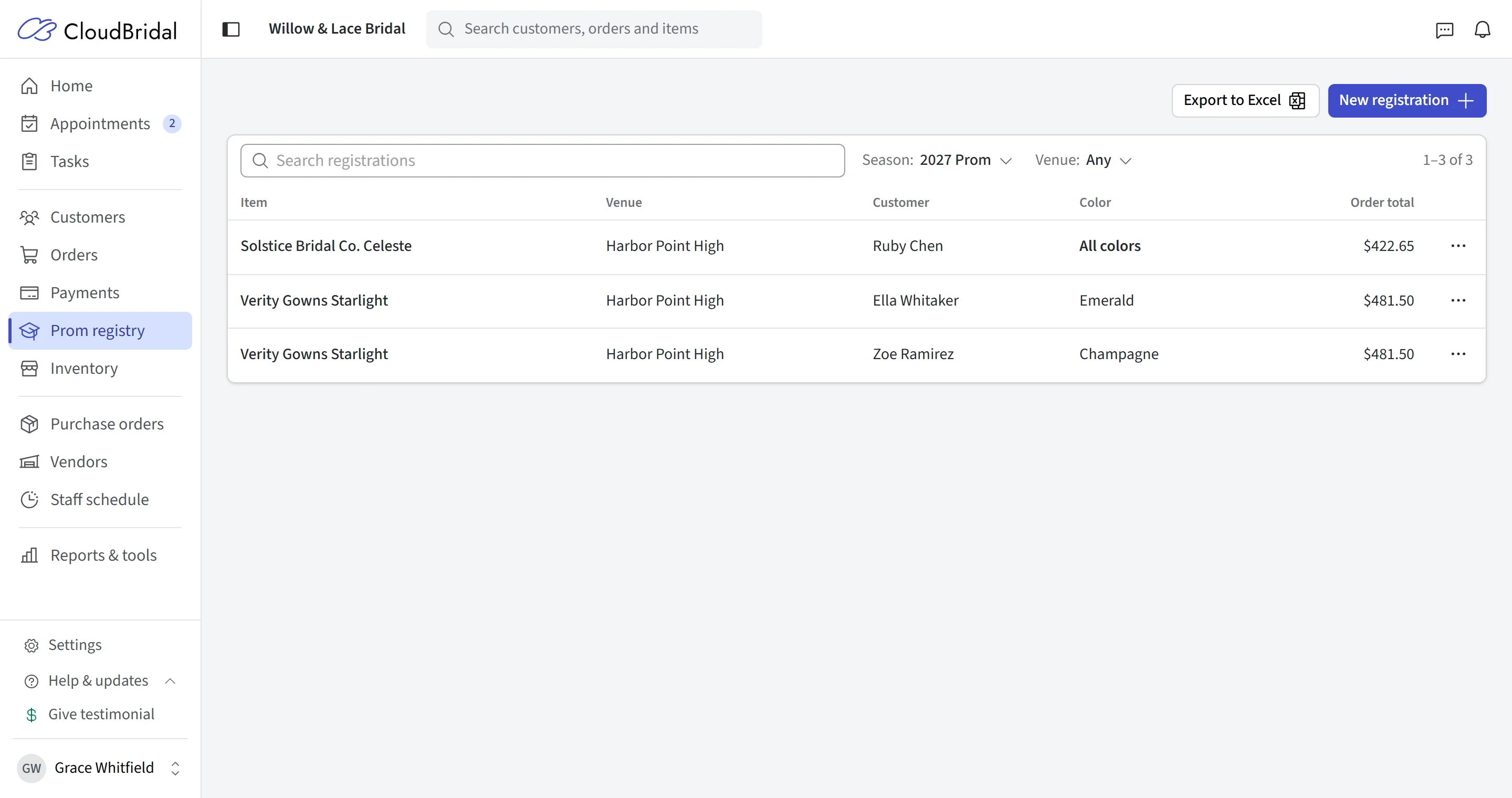
Every registration in one list
See every registration for the season in one place, narrowed to a single school or venue when you need it. Each one shows the student, the dress, its color and the order, so you can answer “has anyone from Lincoln High bought this one?” in seconds.
Need a list for a school or for your records? Export it to a spreadsheet.
- Filter by season and by school or venue
- Search by student, dress, or designer
- Order totals kept up to date, including changes and refunds
- Export to a spreadsheet
And the rest
Small details for a busy prom season
Schools, seasons, and receipts, set up once and kept up to date as you sell.
Your school list builds itself
A default season
You choose what’s tracked
On the order document
Venue on her event
Export to a spreadsheet
Good to know
Frequently asked questions
Common questions about the prom registry in CloudBridal.
Which plan includes the prom registry?
How does CloudBridal decide a dress is a duplicate?
What happens if a student wants a dress that’s already registered?
Can two students from the same school wear the same style in different colors?
Can I register dresses I sold before I turned the registry on?
Which customers and dresses does it apply to?
Can I keep more than one prom season?
Can I export the registry?
Keep exploring
Related features & resources
See how this connects to the rest of CloudBridal.
Appointment scheduling
Add a prom appointment type to your booking page so students can book online. Basic includes 50 appointments a month; Core and Ultimate are unlimited.
Payment processing
Take payment through integrated Stripe payments, including a card reader in the shop, or record payments from your own processor.
Rentals on Ultimate
Rent dresses from your inventory on the same plan as the prom registry, with availability checked against the reservation dates.
Ready for prom season?
Start your 30-day free trial, no credit card required, or book a demo and we’ll walk you through the prom registry.