CloudBridal v26.5.1: Shareable Quotes, Easier Sales Tax Reporting, and a Polished UX
We're excited to announce CloudBridal v26.5.1, headlined by a brand-new way to close sales through end-to-end shareable quotes. Here's what's new:
View complete 2026 release notes →
✍️ End-to-End Customer-Acceptable Quotes
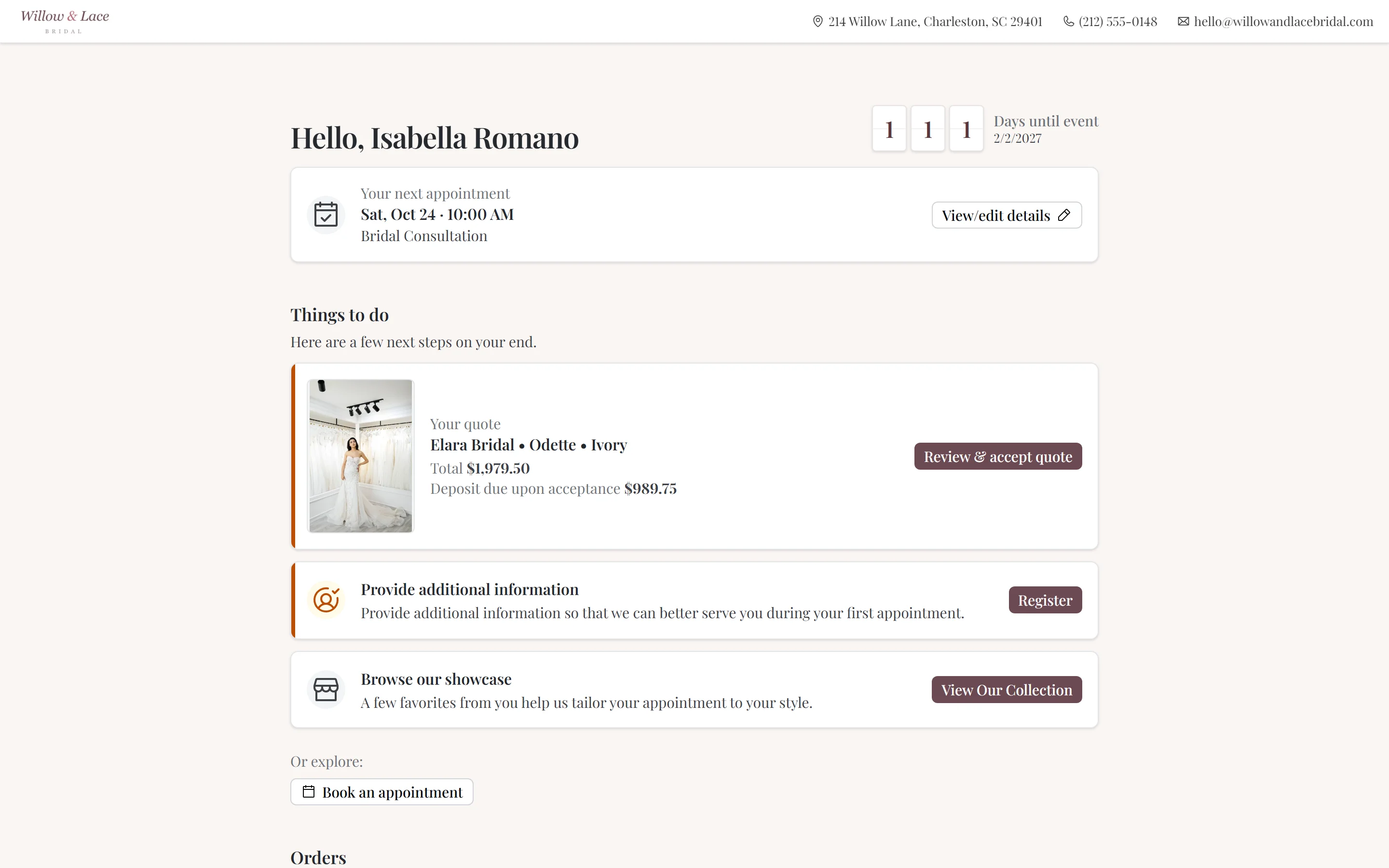
A major new way to close sales: build a detailed quote in CloudBridal, share it with your customer, and let them review, sign, and accept it (and pay a deposit) right from their client portal.
Plan Requirement: Ultimate (uses the Client Portal). Enable in Client Portal Settings under Enable Quote Sharing.
What's New:
- Customer acceptance from the portal — customers tap Accept on the shared quote and CloudBridal converts the draft into a confirmed order automatically
- Real, signature-ready quote documents — quotes generate PDFs from the same templates and agreements you use for in-store sales, with optional staff sign-off baked in
- Deposits at acceptance with Stripe — set a deposit amount (with quick presets for 25%, 50%, 100% of the total) and Stripe collects it the moment the customer accepts
- Works without Stripe too — customers can still accept the quote and you collect the deposit through your usual process afterward
- Multi-quote bundles — share several drafts at once. Perfect for bridal parties where the bride wants to commit to multiple looks together
- Share-ready validation — CloudBridal blocks sending until the quote is complete (vendor, variety, color, pricing all populated), so customers never see a half-finished quote
- Pending alerts — quotes awaiting customer response surface on the dashboard and customer profile
- Customizable email — write your own share-email subject and body, or use the smart defaults
Key Benefits:
- Close sales remotely with a single email — customers no longer need to come back into the store to commit
- Collect deposits the moment a customer says yes
- Stop chasing "did you get my quote?" replies
📊 New Sales Tax Collected Report
A focused summary view for sales tax reconciliation. You could already pull tax totals from reports like Cash Flow Summary and Order Financials — the new Sales Tax Collected report streamlines that into a single, purpose-built view.
What's New:
- Run from the Reports page under Cash & Payments
- Choose your reporting basis to match how your accountant recognizes tax: Order Date of Sale, Order Completed Date, or Payment (cash basis)
- See Net Tax Collected, Tax Refunded, and a per-rate breakdown in a single summary
- Save your preferred reporting basis (and any other filters) as a Custom Report (Ultimate) so you don't have to re-pick them every period — just update the date range when filing
Key Benefits:
- Skip the cross-referencing — see net tax, refunds, and per-rate totals on one screen
- Reconcile against each tax rate you collected, including historical "legacy" rates
- Match your accountant's basis (sale date, completed date, or cash) without rebuilding the view
🔐 More Secure Client Portal Access
The first time your customer opens their portal invitation, they're recognized instantly from the link — no extra steps, no codes to enter. The new security layer only kicks in if they come back to the portal later in a different browser or on another device: CloudBridal sends them a quick one-time code (by email, or by text if their phone number is on file) to confirm it's really them.
The result: a seamless first-time experience for your customers, plus a quiet layer of protection for their documents, payments, and quotes if anyone else tries to access the portal afterward. Customers never have to create or remember a password.
📦 Inventory Transfers Between Stores
If you operate multiple locations through CloudBridal's Linked Stores, you can now move stock between them with a full audit trail.
What's New:
- Initiate from Either Side: Start a transfer from the source (shipping stock out) or destination (requesting stock in)
- Cross-Store Stock Visibility: See what's in stock at each linked store while building a transfer
- Receive Preview: Review the full transfer before confirming receipt
- Pending Transfer Banner: The receiving store sees a banner alerting them to incoming transfers
- Cancel Pending Transfers: Cancel anything before it's received
How to Access:
- Navigate to Inventory and select Transfers from the tools menu
- Requires the Inventory Transfers permission and at least one linked store
🗓️ Additional Improvements
Polish Across the App:
- Several core surfaces received significant UX tweaks this release. The Orders fulfillment page moved to a grouped card layout with per-item purchase-order chips and inline payment summaries — cleaner, easier to scan, and friendlier on mobile. The Customers list got tighter status summary cells, a redesigned name cell, a sort selector, and a better small-screen layout. The customer profile picked up new alerts for pending quotes and signature requests alongside cleaner per-order cards. The Purchase Orders workflow was refined too. And the Client Portal saw a broad refresh — its home page, notifications area, and order/payment surfaces have all been smoothed out for a more consistent customer experience.
Refined Item-Type Controls:
- New options on each item type in Inventory Item Settings:
- Eligible for Purchase Orders — turn off for item types you never order from a vendor (e.g., in-house alterations, service fees), so they don't clutter your PO candidate lists
- Default Vendor — pre-fills the vendor when you add new items of this type. Particularly handy for services you provide yourself (alterations, in-house customization), where your own store is effectively the vendor — set yourself as the default and skip selecting a vendor every time
- Don't Count Orders Toward Customer Conversion — orders of this item type don't convert a prospect into a customer, and they're excluded from customer conversion metrics. Useful for incidental purchases like alterations or service fees, so a shopper who only buys an alteration stays classified as a prospect (and your conversion stats stay focused on real gown/dress purchases)
Item-Specific Add-Ons + Per-PO Inclusion:
- Add-ons can now be defined per inventory item in addition to per vendor. On purchase orders, you explicitly choose which add-ons are included per item via checkboxes — inclusion drives the PO total and the printed PO output.
Customizable Signature Request Email:
- The email customers receive when you send a document for e-signature can now be customized. Set your own subject and body, or rely on the smart defaults.
Email Template Attachments:
- Attach files to your automated email templates in Settings > Email & SMS. Useful for size charts, store policies, or other documents you want to share consistently with every email.
Subscription & Billing Refresh:
- Before switching plans, you'll see a detailed plan-change preview showing exactly what will be charged today (including prorations and discounts). Reactivating a paid subscription no longer re-charges you for periods you've already paid for. The Subscription settings page has also been polished.