Bridal Shop CRM: What It Should Do and How to Use It Well (2026)
A CRM (customer relationship management system) is where a shop keeps everything it knows about each customer: who she is, what she's bought, every appointment, and every message sent back and forth. In most retail that's a nice-to-have. In bridal it carries real weight, because the relationship with each bride runs for months, from the first appointment through her order, her fittings, and her wedding day.
With a handful of brides, you can keep it all in your head and a notebook. Growth breaks that. At some point there are more brides than anyone can remember, staff take over appointments you used to run yourself, and the shop that felt attentive starts dropping threads: a missed follow-up, a fitting nobody confirmed, a bride who has to explain her order again. A good CRM is how a growing shop keeps feeling like a small one.
This guide covers what a bridal shop CRM should keep, how it follows a bride through her journey, and how to use templates, automation, and texting without sounding like a robot.
What a bridal shop CRM should keep
A useful bridal customer record holds more than a name and a phone number:
- Her wedding date, and any other events she's shopping for. Almost everything in bridal is timed from this date.
- How she heard about you, so you can tell which marketing brings brides who buy. Our marketing guide covers what to do with it.
- What she's looking for: style, budget, the gowns she's saved as favorites, and notes from each visit.
- Every appointment and how it went: who she saw, whether she bought, and what happens next.
- Her order: the gown, deposit and balance, expected arrival, and alterations.
- Measurements, so fittings and alterations don't start from scratch.
- Every message you've sent her and every reply, by email and text, in one history any staff member can read.
Why a contact list or a generic CRM falls short
A spreadsheet or phone contacts can hold names, but not the history, so the knowledge still lives in people's heads. General-purpose CRMs are mostly built around sales pipelines: a lead becomes a deal, the deal closes, and the record goes quiet. A bridal relationship works differently:
- It's anchored to a date. Reminders, balance due dates, fittings, and follow-ups all count back from her wedding.
- It keeps going after the sale. The order, the fittings, and pickup take months, and that's when service is noticed most.
- It involves the whole party. Her mother, her bridesmaids, and sometimes several events, from the wedding to the rehearsal dinner.
- It runs alongside appointments, orders, and payments. A CRM that can't see her deposit or her fitting date leaves your staff checking three systems.
That's why most shops are better served by a CRM that's part of their bridal shop software than by a separate sales tool. Our bridal shop software buyer's guide covers what else to look for.
Following the bride from booking to her wedding day
Each step of the journey is a chance to make her feel looked after, and each one is easier when the record is already there.
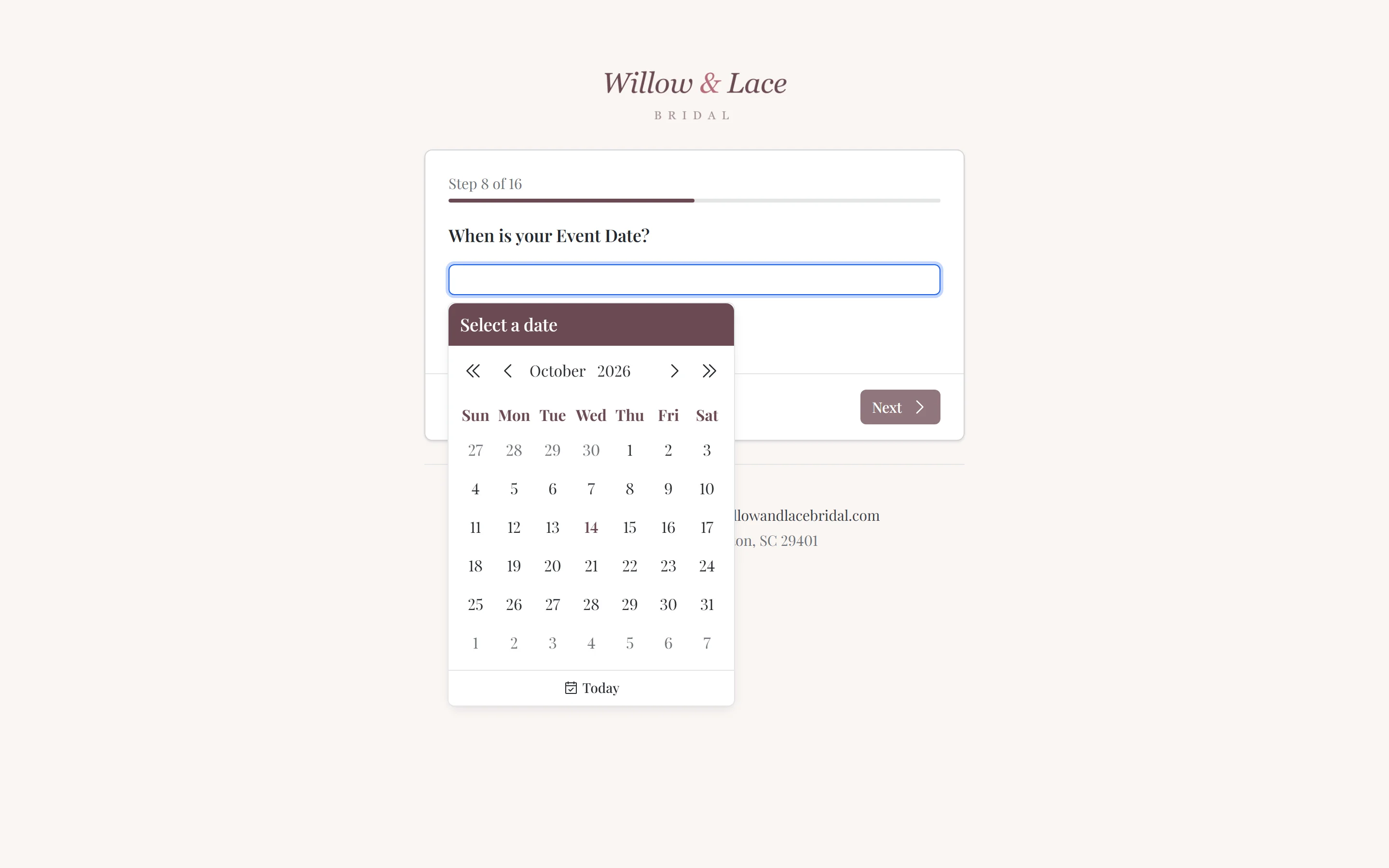
When she books. Online booking captures her details and wedding date, and a confirmation goes out straight away.
Before her first appointment. This is the most uncertain moment of the relationship, and walking in prepared changes how it feels for her. A short questionnaire sent after booking can ask her wedding date, style, budget, and how she heard about you, with the answers landing on her record. If she's saved favorite gowns from your website, your stylist can pull them before she arrives.
At the appointment. Notes on what she loved and what she ruled out, plus the result: bought, coming back, or still deciding.
If she didn't buy. A personal follow-up within a few days, mentioning the gown she loved, brings many brides back. The record tells you who's due one.
After she orders. Her deposit, balance due dates, and the gown's expected arrival live on the order. A self-service client portal lets her check progress and pay balances without calling the shop.
Fittings and pickup. Measurements, alteration notes, and fitting appointments stay together, so whoever is on shift can pick up where the last stylist left off.
After the wedding. A congratulations message that asks for her photos and a review keeps the relationship going, and brides who feel remembered recommend you to their friends.
Templates: write it once, make it good
Writing the same confirmation, reminder, and follow-up one bride at a time is a job nobody has time to do well. Templates fix that: write each message once, carefully, and use it for every bride after.
- Let repetition tell you what to write. Any message you notice yourself typing for the third time should be a template.
- Take your time on each one. Clear wording and a tone that sounds like your shop, whether that's warm, polished, or playful.
- Personalize with her details. Her name, her appointment time, her stylist, and her wedding date make a template read like a personal note.
- Make each one useful. A "what to expect at your first appointment" message helps her prepare. A note when her gown arrives saves a phone call.
- Add a next step where it fits. A link to book, to pay a balance, or to share her wedding photos.
Automation: let the calendar send the routine messages
Once the templates exist, the routine messages can send themselves when something happens: a booking, an appointment the day before, a balance coming due, a wedding date approaching. Automation keeps every bride on the same high standard, even in your busiest month, and frees your team for the conversations that need a person.
A few guardrails keep it from feeling robotic:
- Automate the predictable, write the personal. Confirmations and reminders are perfect for automation. The follow-up to a bride who's torn between two gowns deserves a person.
- Don't pile on. Check what a bride receives in a typical week. Three automated messages around one appointment is too many.
- Time follow-ups for after she's left. A "thank you for coming in" that arrives while she's still in the fitting room feels automated, because it is.
- Aim messages at the right brides. A reminder about prom dresses doesn't belong in a bride's inbox.
Texting brides the right way
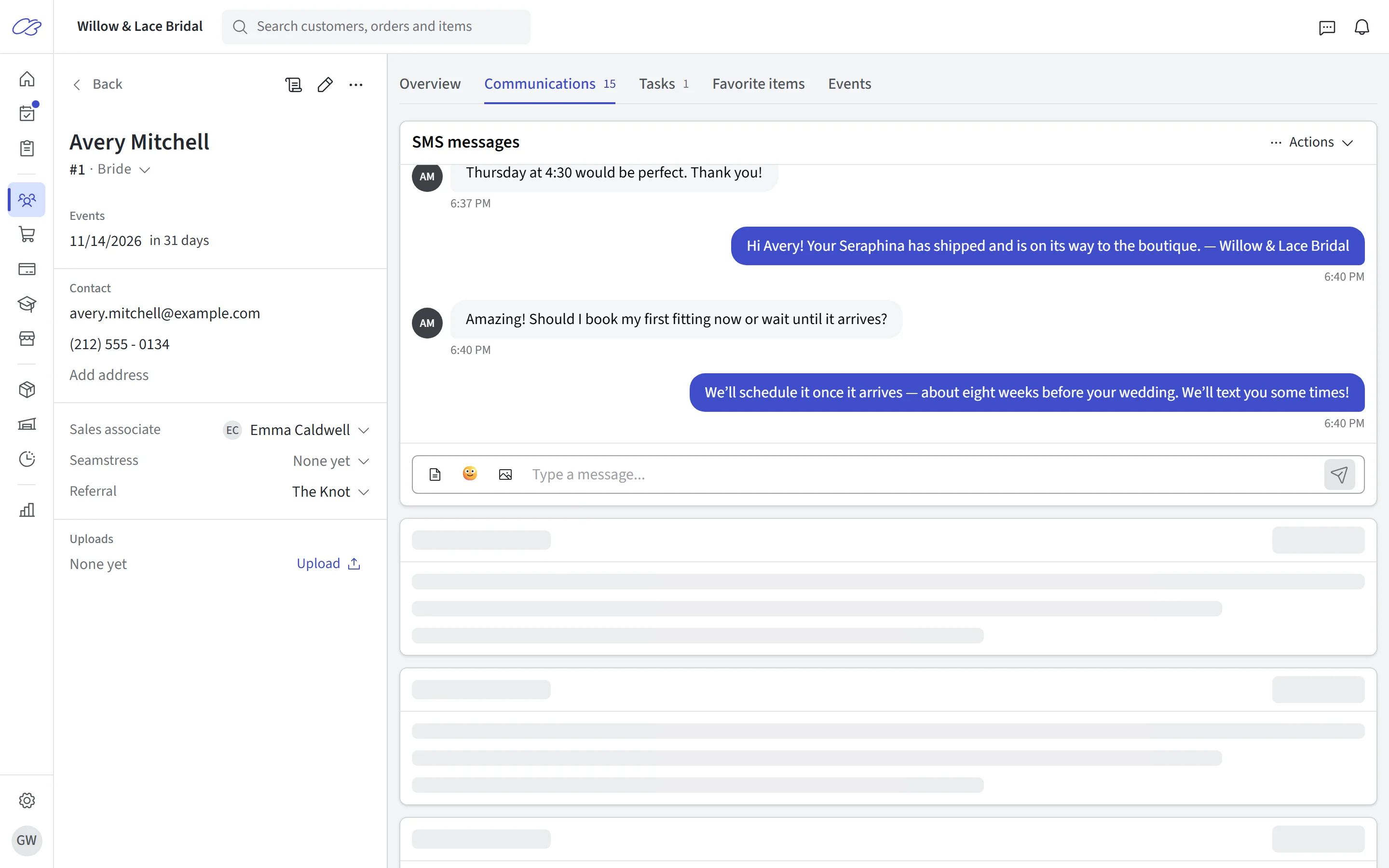
Most brides would rather text than call, and a text gets read in a way an email often doesn't. That's exactly why it should be used carefully.
- A text should be worth interrupting her for. Appointment confirmations, reminders, and "your gown has arrived" qualify. Review requests and promotions belong in email.
- Get consent, and honor STOP. Ask permission to text when she books, and make sure anyone who replies STOP stops receiving texts. In the US, carriers also require business numbers that send texts from software to be registered (often called 10DLC registration), so check that your texting provider has handled it.
- Keep texting two-way. Brides reply. Replies should land where your team will see them, on her record, not on one stylist's personal phone.
- Use templates here too. Even short messages shouldn't be retyped.
Keep the records clean
A CRM is only as useful as what's in it.
- One record per bride. Search before creating a new customer, and merge duplicates when you find them.
- Ask only what you'll use. A short questionnaire gets finished. A long one gets abandoned.
- Write notes for the next stylist. "Loved the lace sleeves, hated anything strapless, mom is paying" is more useful than "nice appointment."
- Protect what you keep. Give staff their own logins rather than one shared password, and don't keep card numbers in notes.
Choosing a CRM for a bridal shop
Look for a CRM that:
- keeps the wedding date, appointments, orders, payments, measurements, and messages on one customer record;
- lets brides book online and fill in a questionnaire before their first visit;
- sends automated, personalized emails and texts timed from appointments and wedding dates;
- shows every staff member the full message history;
- reports where your brides come from and which of them buy;
- is simple enough that your whole team actually uses it.
FAQs
What is a CRM for a bridal shop? It's the system that keeps each bride's details, wedding date, appointments, orders, payments, and messages in one record, so anyone on your team can pick up her story and follow up at the right time.
Does a small bridal shop need a CRM? Once more than one person serves brides, or you can't remember every open order and follow-up, yes. Even a one-person studio benefits from automated reminders and a single history of each bride.
Can I use a general CRM like HubSpot for a bridal shop? You can, but general CRMs are built around sales pipelines rather than wedding dates, appointments, orders, and fittings, so you'd still need separate tools for booking, orders, and payments. Most shops are better served by bridal shop software with the customer record built in.
How many messages should a bridal shop send? Enough to keep her informed, and no more: a booking confirmation, a reminder before each appointment, a follow-up if she didn't buy, updates on her order, and a congratulations after the wedding. If two messages could be one, combine them.
Do I need permission to text brides? Yes. Ask for consent to text when she books, honor STOP replies, and in the US make sure your texting number is registered with the carriers.
Want to see the rest of the bride's journey? Read how a client portal keeps her informed between visits, and the art of upselling in bridal retail for what happens in the fitting room.